Halo
Agent Handoff with New Email Design and In-App Alerts
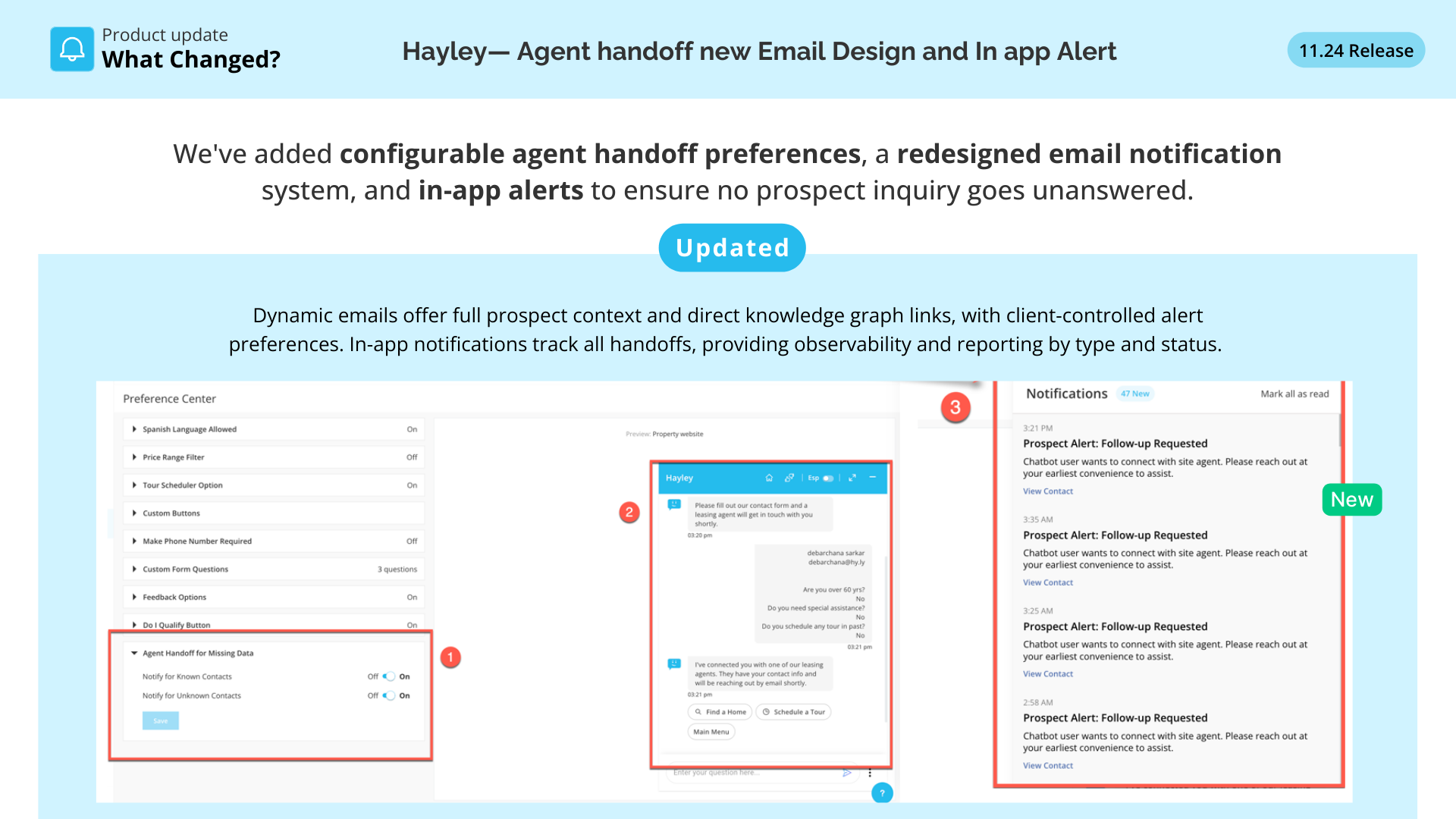
We've added configurable agent handoff preferences, a redesigned email notification system, and in-app alerts to ensure no prospect inquiry goes unanswered.
This means faster follow-ups, better visibility into missing data, and a closed feedback loop between AI and human agents → improving response quality and reducing lead drop-off.
Read the full details here👇
What's New
- Configurable preference settings for agent handoff alerts (toggle notifications for known vs unknown prospects with missing data).
- Redesigned email notifications with dynamic subject lines, clickable node links, and context-rich prospect details.
- In-app notification system displaying handoff alerts directly in the JAI notification bell for KG and Hayley Chat pages.
Why This Matters: Intelligence Fabric Story
- Agents only received basic handoff emails with limited context
- No visibility into which KG nodes were missing or causing AI gaps
- Unknown prospects with unanswered queries had no follow-up mechanism
- No centralized tracking of handoff alerts or agent response rates
Now:
- Dynamic emails with full prospect context and direct KG node links
- Client-controlled preferences for when to send alerts
- In-app notifications ensure no handoff is missed
- Observable, reportable system tracking every handoff by type and status
Business Impact
- Faster agent response → emails now include direct links to update missing KG nodes
- Better lead capture → configurable alerts for unknown prospects prevent drop-off
- Reduced churn risk → data gaps surface instantly with actionable next steps
- Improved AI accuracy → closed feedback loop helps teams fill missing nodes faster
- Full observability → weekly reports track handoffs, notification open rates, and missing data patterns
Built By
- Product Manager: Gul Jabeen
- Alla Sai Sanath
- Waleed Asgar
- Junaid Abdullah Mansoor
- Aena Hassan
- Neha Mishra
- Rana
- Auroob Amjad
- Mohsin Raza
How to Use It
-
Navigate to Journey AI → Preference Center → Agent Handoff settings
-
Toggle "Notify Known Contacts" and "Notify Unknown Contacts" based on your property needs
-
Check your email or JAI notification bell when handoffs occur
-
Click "View Contact" to navigate to the CRM page or node links to fill missing data
-
Review weekly handoff reports to identify top missing KG nodes and improve AI performance
Who Benefits
- Site Agents: actionable alerts with full context
- CSMs: visibility into data gaps and handoff patterns
- Onboarding Teams: faster identification of critical missing nodes
- Clients: better lead follow-up and AI quality